You know how this goes. A prospect replies with a budget, a timeline, and the name of the person who actually signs off. Good email. Important email. You think: I should put that in the CRM.
You don't. Not right then — you're mid-thread and you'll do it later. "Later" never has a specific time attached to it, so it doesn't happen. Three weeks on, someone asks where that deal stands, and the honest answer is "somewhere in my inbox."
The Problem Isn't Discipline. It's Distance.
Every CRM asks you to leave the place where the work happened and re-enter it somewhere else. Open the tab, find the contact, click Add Note, retype what you already read, pick a stage from a dropdown, save. Forty seconds, maybe.
Forty seconds is nothing — except you're being asked to pay it at the exact moment you're busiest, for a benefit you won't feel for weeks. So the note doesn't get written. And a CRM with half its notes missing isn't half useful. It's zero percent trustworthy, which is worse, because now you have to check your email anyway to see whether the CRM is lying to you.
Quick math: if you have 12 real conversations a week and log even half of them, that's 6 records a week you're maintaining by hand. Skip two weeks — a launch, a holiday, a bad flu — and you've got a 12-record hole, right in the stretch you'll most want to remember later.
What Gmail Does (and Doesn't Do) Natively
Gmail isn't nothing here. Open an email and the contact card shows a name, maybe a photo, and recent threads with that person. Google Contacts stores their phone and company. Google Tasks can hold a to-do.
What Gmail won't tell you: whether this person is a live deal or a cold one. What was agreed on the call last Tuesday. Who else at their company you've been talking to. What you promised to send, and whether you sent it.
That's the actual gap. Not storage — Google already stores plenty. Context, assembled in the place you need it.
A Better Approach: Put the CRM Where the Work Already Is
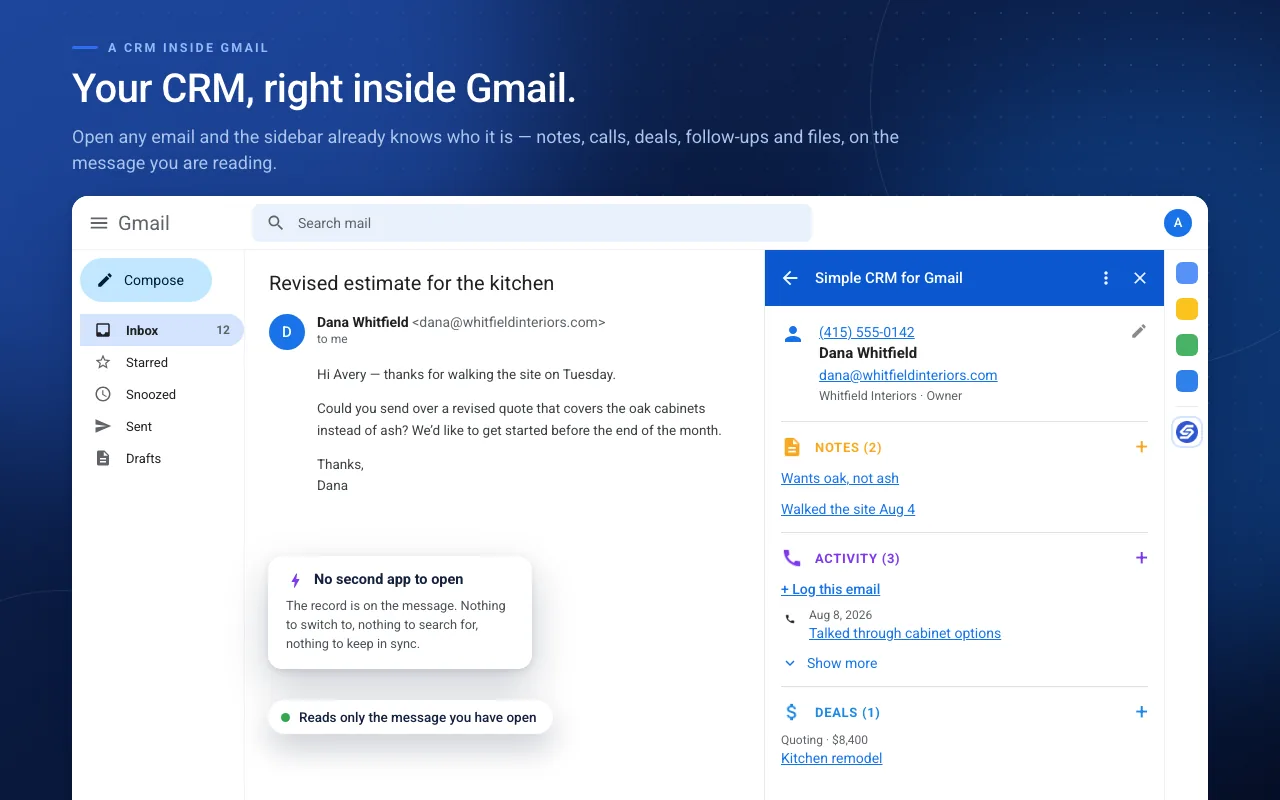
Simple CRM for Gmail is a sidebar. You open an email; it shows you that person as a CRM record — their notes, open deals, tasks, logged calls and meetings, and attached files — right beside the message that made you want it.
Open any email
For a message you received, the sidebar shows the sender. For one you sent, it shows everyone you sent it to.
New contacts arrive prefilled
Name and email come from the headers, the phone number is read out of the signature, and the company is guessed from the domain. You check it and hit save.
Log it while you're looking at it
A note, a call, a task with a due date, a deal with a stage and a value — without leaving the thread.
The forty seconds becomes about four. And — this is the part that matters — you pay it while you're already looking at the thing you're recording.
Simple CRM for Gmail is live
Install it from the Google Workspace Marketplace and it appears in your Gmail sidebar. 14-day free trial, no credit card.
Install from MarketplaceWhat You Can Actually Do From the Sidebar
- Log a call, meeting, email or note — typed, dated, attached to the person, without opening a tab.
- Create a deal with a stage, value, close date and any custom fields you want. Don't like the word "deal"? Rename it — some people run Projects, some run Opportunities, some run Matters.
- Set a follow-up task with a due date, linked back to the email that prompted it, so future-you can click straight to the source.
- Schedule a meeting — it creates the Calendar event, sends the invite, and logs the meeting on the contact in one step.
- Attach a file from the open email or from Google Drive.
- Build your own tables for properties, invoices, matters, shipments — anything the defaults don't cover — and link those records to contacts and deals.
The Company View You Didn't Have to Set Up
When several contacts share an email domain, they're treated as one account. Open anyone at Acme and you see the notes, tasks and deals from everyone at Acme — with no "create a company record and link the contacts to it" ceremony. It follows the domain. If a particular contact shouldn't be pooled that way, you can opt them out.
Then There's the Morning View
The home screen is the other half. Not a dashboard with seven charts — just what's overdue, what's due today, what your open pipeline is worth, and your biggest live deals, filterable by stage. Plus the records you looked at recently and a search box over everything.
It's the thirty seconds at the start of the day that tells you which threads to reopen. If nothing's due, it says so and gets out of the way.
Spreadsheet vs. Full CRM vs. Inbox
| Spreadsheet | Full CRM | In your inbox | |
|---|---|---|---|
| Cost of logging something | Low | High | Nearly zero |
| Context where you need it | No | In another tab | Beside the email |
| Setup before it's useful | Minutes | Days | None |
| Still accurate in month three | Rarely | Only if enforced | Yes — it's cheap to keep up |
What This Looks Like in Your Work
The argument above is the same whoever you are, but the vocabulary is not. A builder does not have deals and a student does not have clients. Each of these walks the same five minutes through a different inbox:
- Freelance designers and developers — catching scope creep in the email it arrived in, before it becomes unbilled work
- Independent consultants — scope, fixed dates and stakeholders from the engagement email that names them all once
- Contractors and remodelers — permits, change orders and the selection deadlines that gate the schedule
- Comparing the options — Streak, Copper, NetHunt, Salesflare and where each one wins
- Real estate agents — the walk-away number, the contingency date and the rate lock, all in one email
- Travel agents — passenger counts, dietary needs and passport expiry, needed for months
- College students — professors, office hours and assignment deadlines
Rename Deals to Projects, Engagements, Jobs or Courses in settings and the rest follows.
Where Your Data Lives
Your contacts stay in your Google Contacts. Tasks in your Google Tasks. Notes, activity, deals and custom tables live in ordinary Google Sheets inside a folder in your Drive — one spreadsheet per object, which you can open, sort, chart or export without asking us for anything.
There's no separate database holding your relationships hostage. That's a deliberate design decision, and it's worth its own post.
Getting Started
Install the add-on, open any email, and the person appears in the sidebar immediately — pulled from the Google Contacts you already have. No import, no field mapping, no onboarding call. The first note you write is the first minute you spend.
It's $15 a month or $149 a year, after a 14-day free trial with no credit card. And when a trial ends, your records don't disappear behind a paywall — the add-on goes read-only. You can always see everything you put in. Holding your own notes hostage is a bad way to earn a subscription.
Simple CRM for Gmail is live
Install it from the Google Workspace Marketplace and it appears in your Gmail sidebar. 14-day free trial, no credit card.
Install from Marketplace